Free for 3 days · Windows 10 and 11
Download Frametide
Click the button to download the installer, then follow the steps below.
Download Frametide-win-Setup.exe →
Four steps, about a minute
-
1
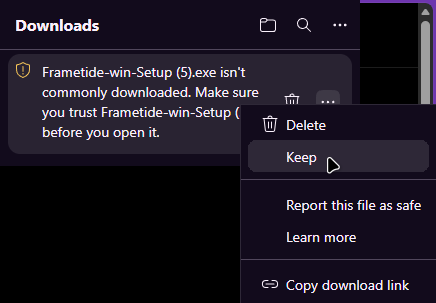
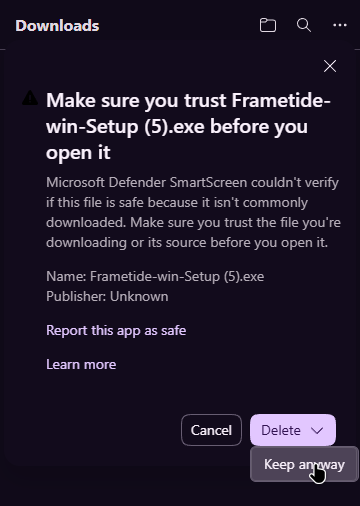
Keep the file
Your browser says the file "isn't commonly downloaded". That only means Frametide is new. In Edge, click the three dots next to the file and choose Keep. Edge asks once more: open the little arrow next to Delete and choose Keep anyway. In Chrome: Download anyway.
German Windows: wird häufig nicht heruntergeladen · Beibehalten · Trotzdem beibehalten
 12
 3
-
2
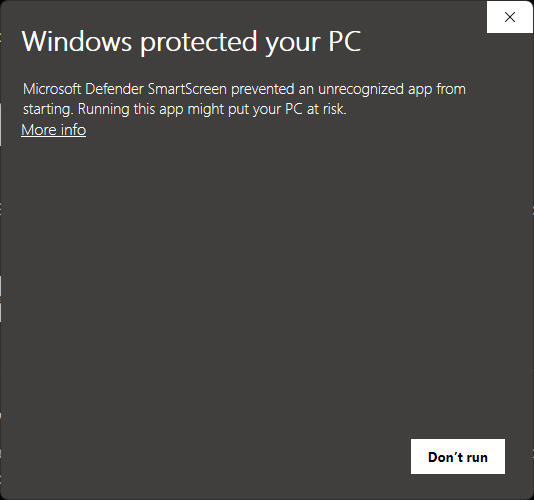
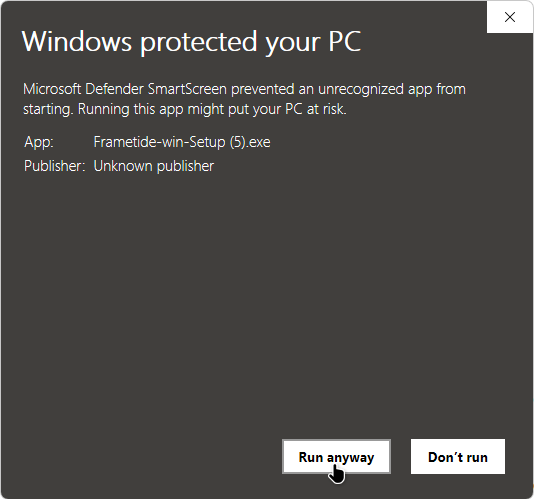
Open it. If Windows says "Windows protected your PC": More info, then Run anyway
On many PCs Windows first shows a box "Windows protected your PC". It appears for every program that is new and not yet installed by many people. Click More info, then Run anyway. No such box? Go straight to step 3.
German Windows: Der Computer wurde durch Windows geschützt · Weitere Informationen · Trotzdem ausführen
 1
 2
-
3
Click "Yes", not the blue "No"
Windows asks whether the app may make changes to your device. Frametide asks for this because it changes Windows settings, and it asks again at every start. Windows preselects the blue No: click Yes.
German Windows: Benutzerkontensteuerung · Ja · Nein
User Account Control Do you want to allow this app from an unknown publisher to make changes to your device?Frametide.exePublisher: Unknown
Show more details
File origin: Hard drive on this computerYes1No -
4
Click "Start free trial"
Frametide opens, scans your PC and shows what's set up wrong. No account, no payment details.
Screenshots from Windows 11 with Microsoft Edge (the last box is redrawn); other browsers, light mode and Windows 10 look a little different. Want to check the file first? How to verify it, and why Windows warns about new programs.
Every change Frametide makes can be undone, and when the trial ends without a purchase it puts your settings back.
Stuck? Write to support@frametide.de.